 TCOS
Customers order what they want from your Telegram shop, no phone call needed
Share your link with your customers once. They choose what they want and send their order, and the payment goes straight into your Telebirr or bank account.
Use it free for 30 days; registering is completely free.
We handle test orders ourselves, live, during working hours.
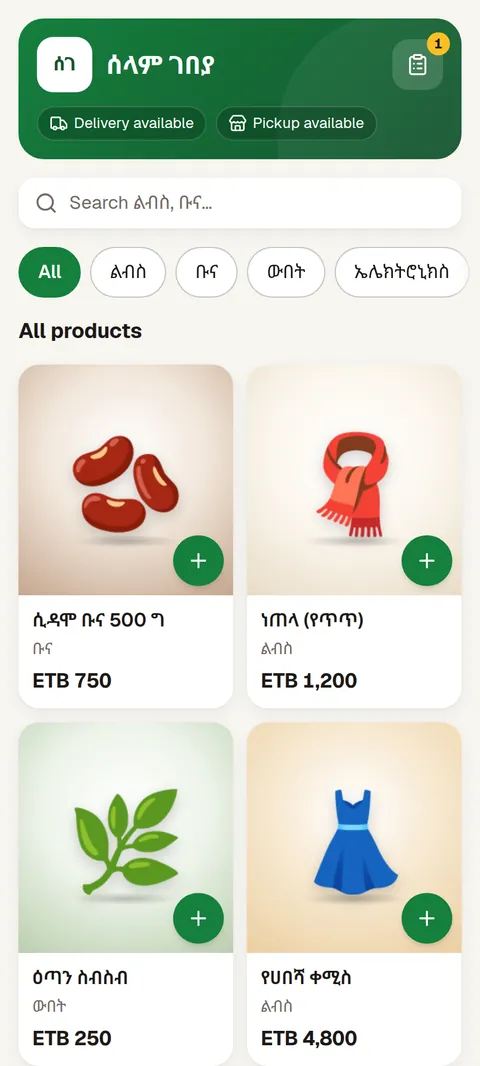
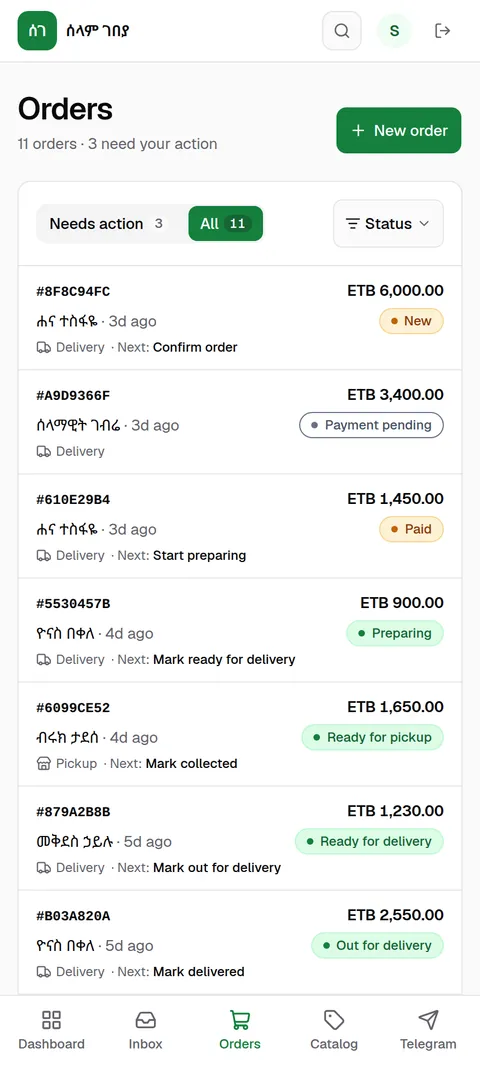
Still telling customers "call us to order"?
Today
- If you miss a call, your customer may go to another seller.
- You take photos of your items and send them to customers one by one.
- Finding payment receipts among all your messages is hard.
- Customers keep calling to ask "how far along is my order?"
With TCOS
- Your shop is always open, and customers order whenever they like.
- All your items in one place, with their prices, on one link.
- Receipts are kept together, attached to their orders.
- Customers can see the status of their order directly.
From shop link to payment: how does TCOS work?
See real TCOS screens from our demo shop. Phone numbers are hidden for safety.
 1
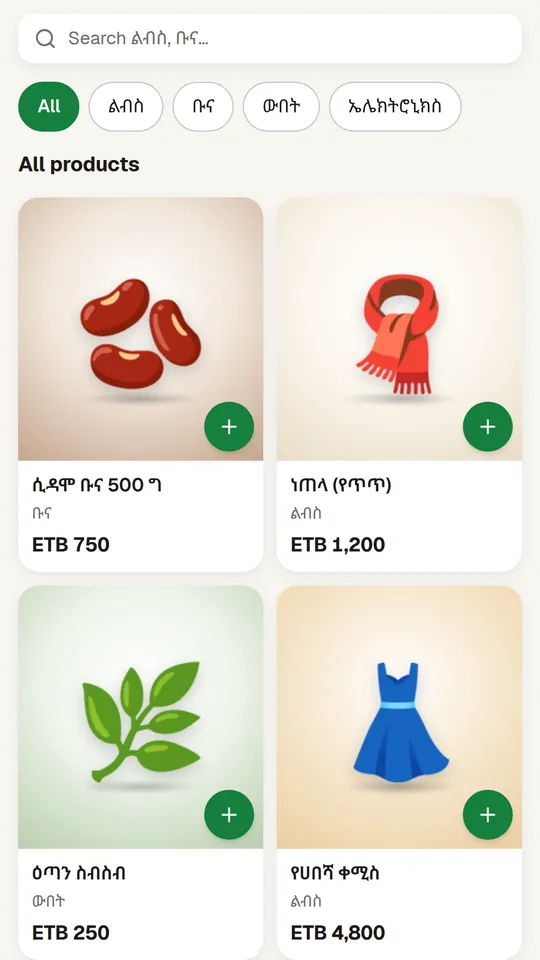
The customer opens your shop link.
Your shop opens inside Telegram, and the customer sees every item with its photo and price.
 2
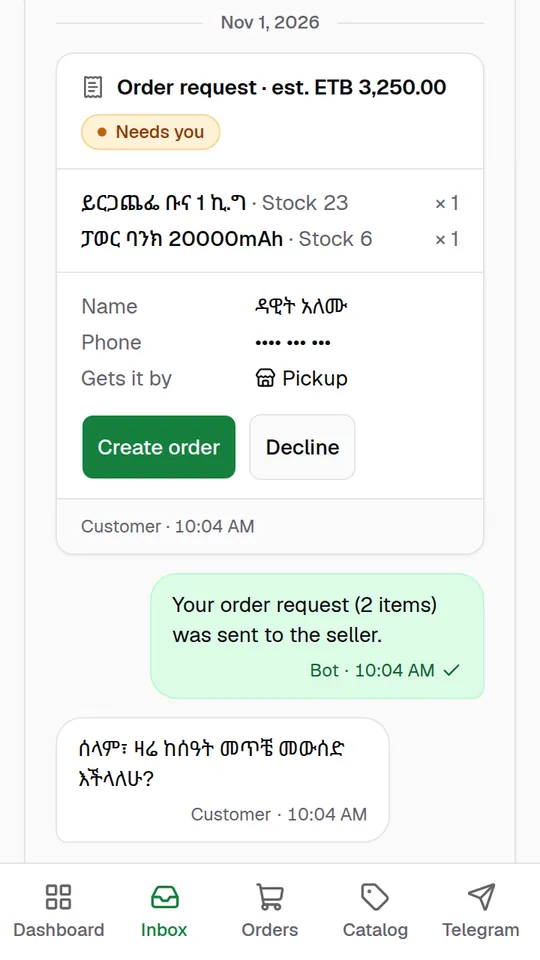
The order reaches you with all the details you need.
The items ordered, the customer's name and phone number, and delivery or pickup details.
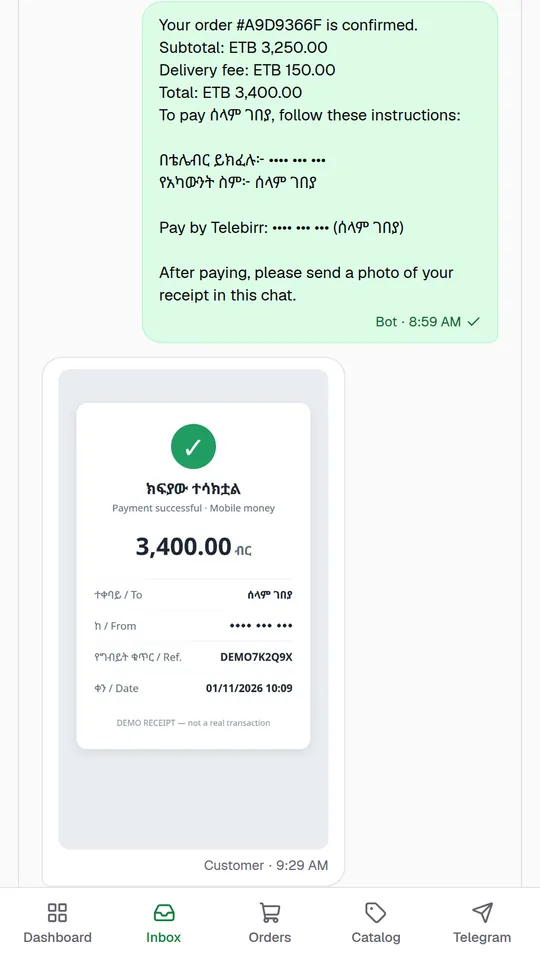 3
Your bot shows the customer your payment details.
The total to pay, and your Telebirr or bank account details.
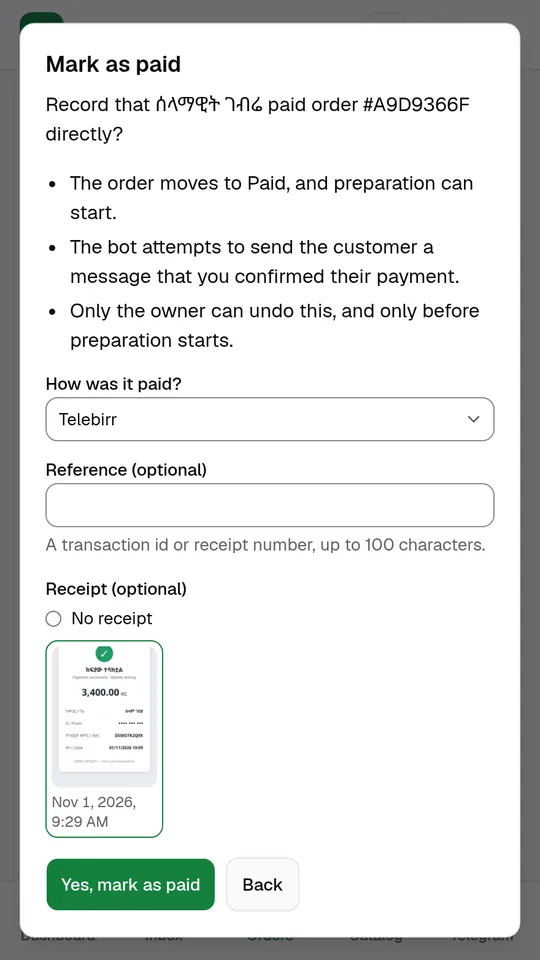 4
You check the receipt and confirm the payment.
The bot sends the customer a confirmation message.
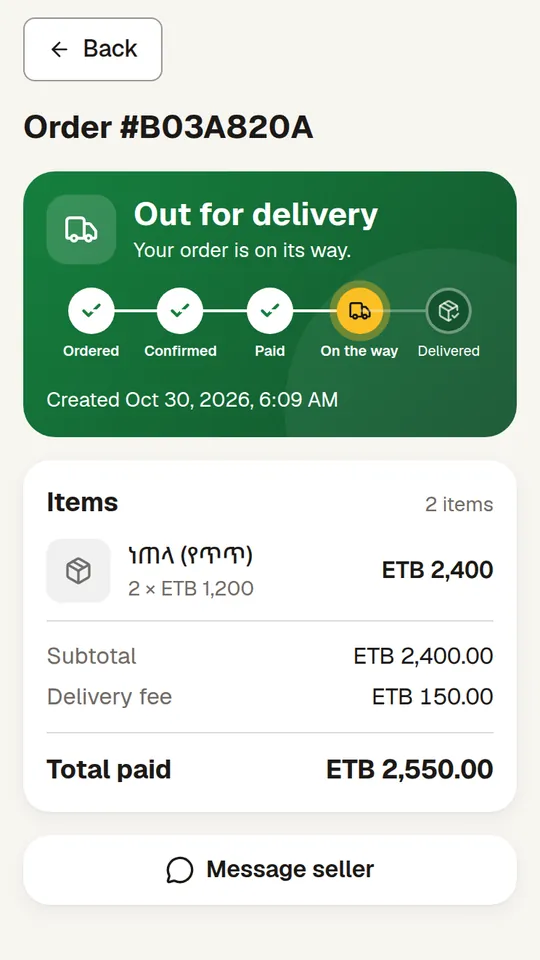 5
The customer follows what stage the order has reached.
Without having to call you.
Why choose TCOS?
The money reaches you directly.
The customer pays straight into your Telebirr or bank account. The money does not pass through TCOS.
Telebirr or bank, confirmed by receipt
Your payment details (Telebirr, Commercial Bank of Ethiopia, Awash… whichever you want) are sent from your bot; the customer sends a photo of the receipt; you check it and mark the order paid.
All your orders in one place!
Your orders and messages are all in one place, and "Needs action" shows the work that needs your attention next.
Delivery or pickup.
When you confirm, the delivery fee is added to the total; you can also let customers collect from your shop.
Sold-out items can't be ordered.
If you enter a quantity, the shop tells the customer how many are left once 5 or fewer remain.
Use it on your phone too!
You can use the dashboard from your phone, and you can turn on notifications.
Start in four simple steps!
Register
You only need your business name, email and password. Until your registration is approved you can add your products and set up your bot; once it's approved, customers can place orders.
Connect your bot
Create your own free Telegram bot. You'll find the steps right here.
Add your products
Enter the photo, price (in birr), size and colour.
Share the link
Share it on your Telegram channel, TikTok and Facebook. Customers place orders; you confirm them.
Create your Telegram bot easily!
- Open Telegram and search for @BotFather.
- Send
/newbot. Choose a name for your bot and a username ending in "bot". - Copy the Token BotFather gives you. Don't show it to anyone.
- Go back to your TCOS dashboard. Open the Telegram page and paste the Token, then tap Connect bot.
Creating a bot is free. If you need help, message us at @tcos_support. We're ready to help.
Pricing and payment
A free trial, then a monthly payment.
Ask us about the price at @tcos_support.
- Today: registerYou only need your business name, email and password. There is nothing to pay to register.
- Once approved: 30 days freeThe free trial starts after your registration is approved.
- Then: pay monthly by TelebirrPayment happens only when you pay; nothing is taken from your account automatically.
Why you can trust us
- Your money goes straight to you.Your customers pay directly into your Telebirr or bank account. TCOS does not hold your money.
- We approve every shop.We approve new shops between 9:00 AM and 9:00 PM (Ethiopia time). It usually takes a few hours.
- No other seller sees your customersEach seller sees only their own customers.
- Support on Telegram.If you need help, message us at @tcos_support.
Frequently asked questions
How much does it cost?
There is a 30-day free trial. After that you pay monthly by Telebirr. Ask us about the price at @tcos_support.
Where does the money go? Does TCOS hold it?
The customer pays directly into your Telebirr or bank account. TCOS does not hold your money. You are the one who checks the receipt and confirms the payment was made.
Do my customers have to download an app?
No. Telegram is all they need.
Which bank can my customers pay with?
Whichever bank you choose. In your payment details you enter your Telebirr, CBE Birr or chosen bank account details.
Do I need my own bot?
Yes. BotFather lets you create your own bot for free. The steps are explained above, and we can help if you need it.
What if a customer doesn't pay?
The order stays "Payment pending". Don't mark it paid until the receipt shows the money reached your Telebirr or bank account. You can also cancel the order. If it has items with a stock quantity entered, that quantity goes back into stock when the order is cancelled.
Can I deliver products to customers?
Yes. When you confirm the order, the delivery fee is added to the total. You can also let customers come to your shop and collect their products.
Is my phone enough?
Yes. You can use the dashboard on your phone, and you can also install it like an app and turn on notifications.
Is the dashboard in Amharic?
The dashboard is in English for now, and so are your shop's buttons and the bot's automatic messages. But you can enter your shop's name, your product names, your payment details and the messages you write to customers in any language you like.
What if I don't pay after the free trial ends?
After the free trial ends you can keep selling for 7 more days. After that, until your payment is recorded, you can't create or confirm new orders, and the bot and your shop page tell customers the shop is temporarily unavailable. Orders started before then carry on being handled.
Start today
Try the demo shop as a customer, or open your own shop for free.
We handle test orders ourselves, live, during working hours.